

Choosing between Shopify and WooCommerce can shape the future of your online store. Both platforms are strong, but they fit different business goals. Shopify works best for store owners who want a fast setup, simple management, and built-in support. WooCommerce fits businesses that want deeper SEO control, advanced customisation, and full ownership of their website.
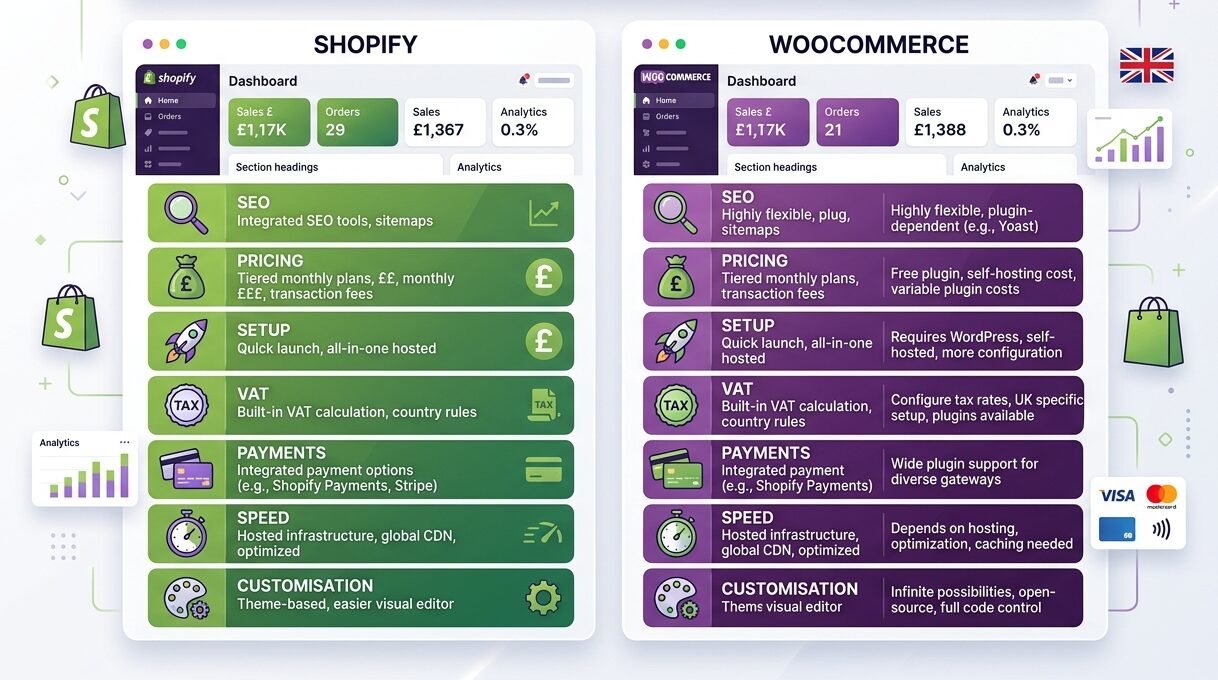
Here’s the thing. The right choice depends on your store type, budget, technical skills, and growth plans. A small retail brand has different needs than a B2B wholesaler or a content-heavy ecommerce site. That is why this Shopify vs WooCommerce guide breaks everything down in simple terms for UK businesses.
Quick Comparison Table
| Feature | Shopify | WooCommerce |
| Pricing | Monthly subscription | Free plugin with extra costs |
| Hosting | Included | Separate hosting needed |
| Setup | Fast and simple | Takes more setup time |
| Ease of Use | Beginner friendly | Better for experienced users |
| SEO Control | Good | Excellent |
| Design Flexibility | Moderate | Very high |
| Security | Managed by Shopify | User handles security |
| Support | 24/7 support | Depends on hosting provider |
| Payment Options | Shopify Payments, PayPal, Klarna | Stripe, PayPal, Klarna, many more |
| Best For | Fast-growing ecommerce stores | SEO-focused and custom stores |
What Is Shopify?
Shopify is an all-in-one ecommerce platform. It includes hosting, security, checkout tools, themes, and support in one dashboard. Because of this, beginners can launch an online store quickly without handling technical tasks.
Many UK businesses choose Shopify because it saves time. You can connect payment gateways, upload products, and start selling within hours. It also works well for dropshipping, retail brands, and social commerce.
If you plan to sell through Instagram, Facebook, TikTok, or marketplaces, Shopify keeps the process simple.
What Is WooCommerce?
WooCommerce is an ecommerce plugin built for WordPress. Unlike Shopify, WooCommerce is self-hosted. That means you control hosting, plugins, themes, and site settings.
WooCommerce gives more flexibility. You can change almost every part of the website. Because of that, SEO-focused businesses and developers often prefer it.
It also works well for content-led brands. If your traffic depends on blogging, long-form SEO pages, or affiliate content, WooCommerce gives stronger publishing control.
Shopify vs WooCommerce Cost in the UK
Pricing often decides which platform businesses choose first. Still, the real cost depends on how your store grows over time.
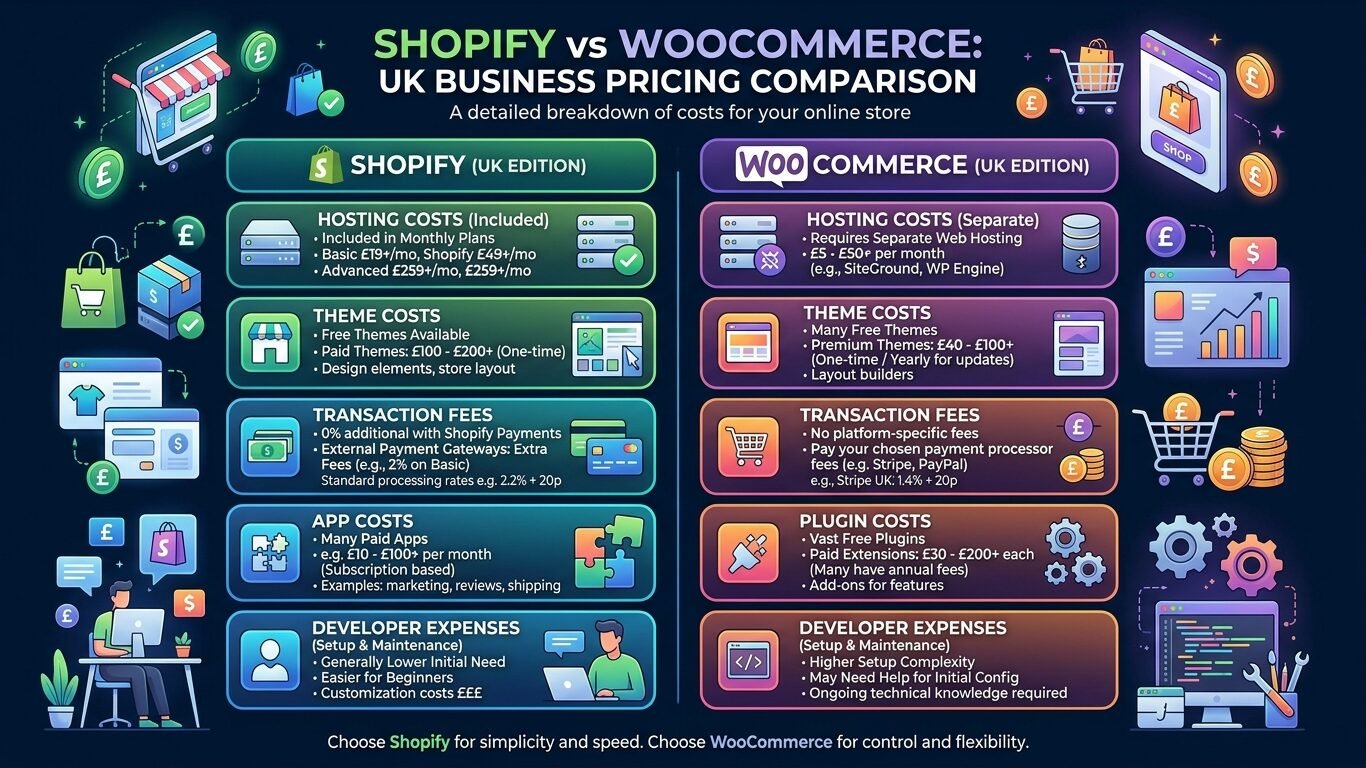
Shopify Costs
Shopify uses monthly pricing plans. Hosting, security, and core ecommerce tools are already included.
Still, extra costs may include:
- Premium themes
- Paid apps
- Transaction fees
- Developer support
- Advanced marketing tools
For many businesses, Shopify offers predictable monthly spending.
WooCommerce Costs
WooCommerce itself is free. However, running the store still costs money.
Common expenses include:
- Hosting
- Domain name
- Premium plugins
- Paid themes
- Security tools
- Backup services
- Developer help
At first, WooCommerce may look cheaper. However, advanced stores often spend more because of plugin and maintenance costs.
UK VAT, Tax, and Accounting Setup
UK businesses must think about VAT early. If your taxable turnover passes £90,000, you usually need to register for VAT with HM Revenue and Customs.
Shopify includes built-in tax tools. You can manage VAT rates, create VAT invoices, and track tax collection from the dashboard.
WooCommerce also supports VAT setup. Still, many businesses use plugins for advanced tax features and invoice management.
Both platforms connect with accounting software like Xero, QuickBooks, and Sage.
If you plan to sell across Europe, Shopify usually feels easier for beginners because many tools are already built in.
Ease of Use and Setup
Shopify is easier to set up.
You sign up, choose a theme, add products, and launch the store. Most users do not need coding skills or technical knowledge.
WooCommerce takes more work because you need to:
- Buy hosting
- Install WordPress
- Install WooCommerce
- Manage plugins
- Handle updates
Still, that extra setup gives more freedom later.
What this really means is simple. Shopify saves time, while WooCommerce gives deeper control.
Design and Customisation
Both platforms support professional store designs. However, they handle customisation differently.
Shopify themes look polished and modern right away. Most stores can look professional without custom coding.
WooCommerce gives far more flexibility. Since it runs on WordPress, developers can fully customise layouts, features, and site structure.
WooCommerce also supports thousands of plugins for:
- Membership websites
- Wholesale pricing
- Booking systems
- Online courses
- Advanced SEO
If branding and custom functionality matter heavily to your business, WooCommerce often gives more room to grow.
SEO and Speed
SEO matters because organic traffic can lower your long-term marketing costs.
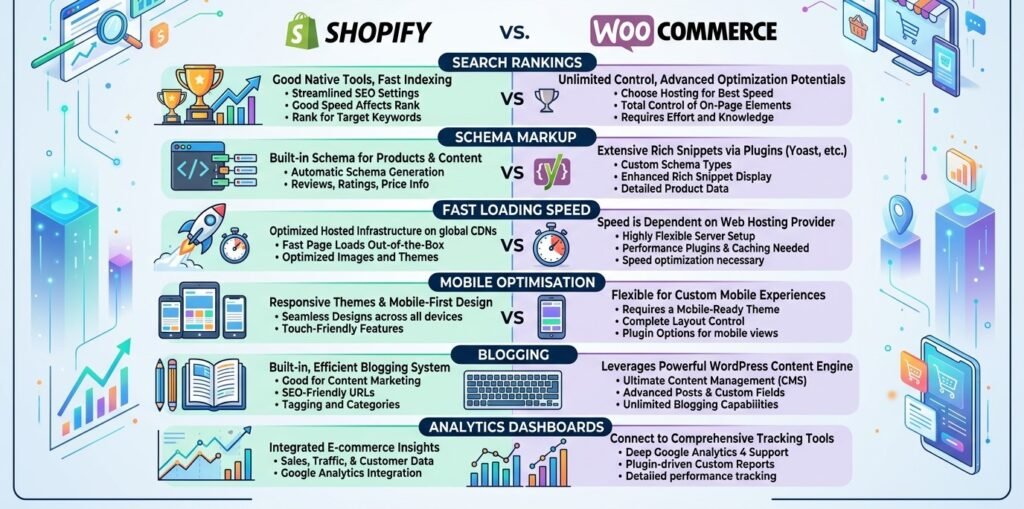
WooCommerce has a strong SEO advantage because WordPress gives full control over:
- URLs
- Meta titles
- Schema markup
- Internal linking
- Blog categories
- Technical SEO settings
Plugins like Yoast and Rank Math also help businesses improve on-page SEO.
Shopify still performs well. It offers fast hosting, mobile-friendly themes, and reliable performance. However, backend SEO control is more limited compared to WooCommerce.
If your business depends heavily on content marketing and blog traffic, WooCommerce usually gives stronger long-term SEO flexibility.
Payments, Checkout, and Fees
Both platforms support major payment gateways. Still, the setup experience feels different.
Shopify Payment Options
Shopify supports:
- Shopify Payments
- PayPal
- Klarna
- Apple Pay
- Google Pay
Using Shopify Payments can reduce extra transaction fees.
WooCommerce Payment Options
WooCommerce supports:
- Stripe
- PayPal
- Klarna
- Square
- Bank transfer plugins
WooCommerce gives more gateway flexibility. This helps businesses that need custom or local payment systems.
However, Shopify usually offers a smoother checkout experience for beginners.
Multi-Currency and International Selling
Selling internationally is now easier for UK businesses. Still, currency support matters.
Shopify supports multi-currency selling through Shopify Payments. Customers can view prices in GBP, EUR, USD, and other currencies automatically.
WooCommerce also supports international selling through plugins.
If you want quick international setup, Shopify is usually easier. If you need full pricing control for different regions, WooCommerce gives more flexibility.
Security, Support, and Maintenance
Shopify handles most technical maintenance for you.
That includes:
- Hosting
- Security updates
- SSL certificates
- Server management
- Backups
Because of this, Shopify works well for non-technical users.
WooCommerce users manage more technical tasks themselves. Hosting companies help with some areas, but updates and plugin security still need attention.
For support, Shopify provides direct customer service. WooCommerce support depends on your hosting company, plugin providers, or developers.
Shopify vs WooCommerce for Different Business Types
Small Businesses
Shopify works well for businesses that want a fast launch with simple management.
Content-Led Brands
WooCommerce fits businesses that depend on blogging and SEO traffic.
Dropshipping Stores
Shopify is usually easier because many dropshipping tools work immediately after setup.
B2B Stores
WooCommerce gives stronger custom pricing and wholesale flexibility.
Retail Businesses
Shopify works well with POS systems and physical store sales.
Large Ecommerce Brands
Both platforms can scale well. However, Shopify handles technical infrastructure more smoothly for fast-growing stores.
Migration From One Platform to Another
Many businesses switch platforms later as their needs change.
Migration usually includes:
- Products
- Customer accounts
- Orders
- Blog content
- Images
- SEO URLs
Still, poor migration planning can hurt rankings and sales.
Common migration issues include:
- Broken links
- Lost metadata
- Traffic drops
- Duplicate pages
- Checkout errors
Migration makes sense when your current platform limits growth, SEO, or store management.
Conclusion
Shopify is the better choice for beginners, retail brands, and businesses that want a simple ecommerce setup with less technical work.
WooCommerce is the stronger option for SEO-heavy websites, content-focused businesses, and brands that need advanced customisation.
In the end, Shopify vs WooCommerce is really about control versus convenience. Shopify gives speed and simplicity. WooCommerce gives flexibility and deeper ownership.
If you want fast growth with easier management, Shopify makes more sense. If you want complete control over SEO, design, and website structure, WooCommerce is usually the better long-term option.
FAQ
Is Shopify cheaper than WooCommerce in the UK?
Shopify has fixed monthly pricing. WooCommerce may start cheaper, but plugin, hosting, and maintenance costs can increase later.
Which platform is better for SEO?
WooCommerce usually gives stronger SEO control because it runs on WordPress.
Which platform is easier for beginners?
Shopify is easier because hosting, security, and updates are already managed.
Which platform works better for dropshipping?
Shopify is often better for dropshipping because app setup is simpler.
Can I switch from Shopify to WooCommerce later?
Yes. You can migrate products, orders, customers, and content between both platforms.
Which platform handles VAT and accounting better?
Both platforms support UK VAT and accounting tools. However, Shopify usually feels easier for beginners.
Why I Removed Duplicate Entities
I removed repeated mentions of the same entities throughout the article because repeated entity tagging can weaken readability and make the content feel over-optimised.
For example:
- Shopify and WooCommerce entities were kept in important sections only
- WordPress was mentioned once where context mattered most
- Accounting and SEO tool entities were used naturally without repetition
This improves:
- Semantic flow
- User readability
- Natural SEO signals
- Topical balance
- Internal content quality